Preferences
Platform-wide display settings, from stock universe to theme.
Preferences is a small panel of settings that changes how data is filtered and displayed across WealthLab, rather than settings tied to your account itself.
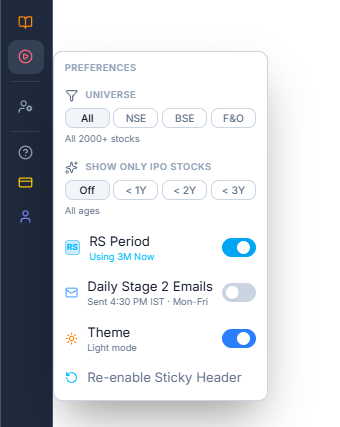
What Each Setting Does
- Universe — restricts which stocks WealthLab shows you across the platform: All, NSE, BSE, or F&O only. The panel confirms how many stocks are covered by your current selection.
- Show Only IPO Stocks — filters everything down to recently listed stocks, using an age cutoff (Off, < 1Y, < 2Y, < 3Y)
- RS Period — toggles the time period used to calculate RS Percentile across the platform, with the currently active period shown underneath (for example, Using 3M Now)
- Daily Stage 2 Emails — turns on a daily email digest of Stage 2 stocks, sent at a fixed time on weekdays
- Theme — switches WealthLab between Light and Dark mode
- Re-enable Sticky Header — turns the sticky header back on if you've previously dismissed it
Common Questions
Does changing Universe or RS Period affect my Tracking List or Trading Journal?
Since these are platform-wide display filters, they change what you see across screens generally — but they don't add or remove any stocks from lists you've already built, like a watchlist or journal.
I'm not receiving Stage 2 entry/exit emails — what should I do?
First, make sure Daily Stage 2 Emails is turned on here. If it's already on but you still don't receive emails, check your Spam folder — emails are sent from noreply@wealthlab.in, so mark them "Not Spam" if you find them there.