Distribution and Market Cap Distribution Panels
See which sectors, industries, and sizes your matched stocks come from.
Once your query returns a set of matching stocks, the next natural question is: what do these stocks actually look like? These two panels answer exactly that.
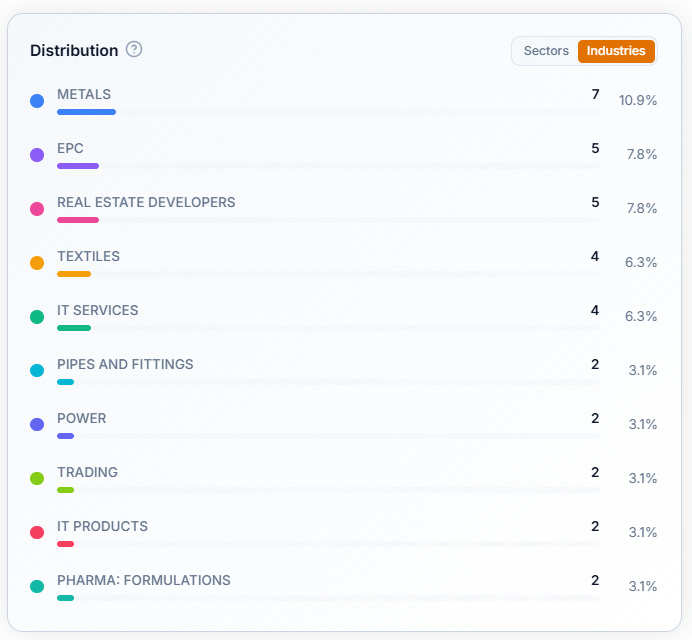
The Distribution Panel
This shows which sectors or industries your matched stocks are coming from — toggle between sectors or industries to check for the distribution within.
If your query pulls back a set of stocks and a large share of them are sitting in one or two industries, that's worth noticing. It might mean your conditions happen to favour a particular kind of business, or it might mean that part of the market is genuinely having a strong earnings season.
The Market Cap Distribution Panel
This breaks the same matched stocks down by market-cap — Mega, Large, Mid, Small, and Micro Cap. It's a quick way to see whether your query is mostly surfacing smaller, less-covered companies, or whether it's pulling in larger, more established names too.
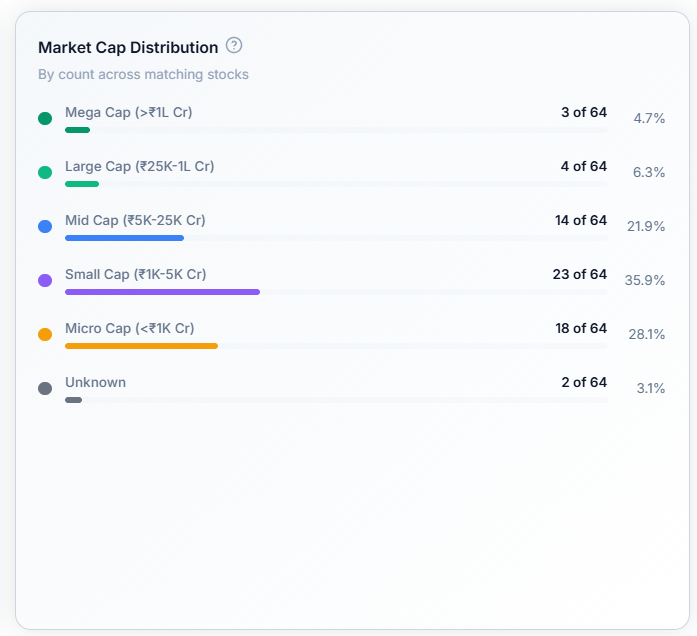
Why Both Panels Matter Together
If you set out looking for broad-based earnings strength and every matching stock turns out to be a micro-cap from a healthcare, that's useful to know before you go any further — these two panels are what let you catch that at a glance, instead of scrolling through every row of the results table.
Common Questions
Why does "Unknown" show up in Market Cap Distribution?
That means WealthLab doesn't have market cap data available for that particular stock yet — it isn't a data error, just a gap for that one company.
Do these panels update automatically when I change my query?
Yes — the moment you run a new query, both panels recalculate to reflect whichever stocks matched this time.