Explore All Indices
A sortable, filterable table covering every Nifty index tracked.
This table holds the complete picture — every Nifty index WealthLab tracks, laid out so you can sort and filter on your own terms rather than relying on a pre-filtered top list.
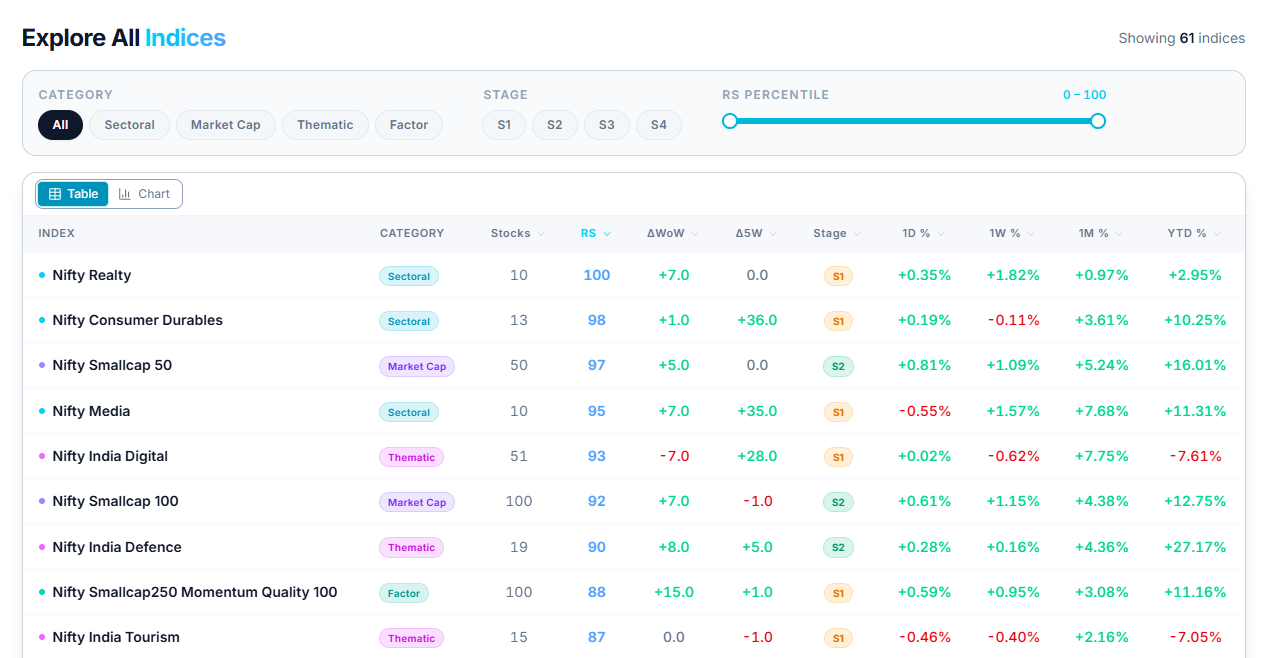
What's in the Table
Every index appears as its own row, and every column can be sorted. Beyond relative strength, you can sort by Stage — the trend stage the index itself is currently in — or by returns over 1D, 1W, 1M, and YTD, which tells you something a rank alone doesn't.

Filtering by Category
Selecting a Category — Sectoral, Market Cap, Thematic, or Factor — narrows the table down to just the indices of that type, letting you compare like with like directly, rather than scrolling through the full mixed list to find them.
Common Questions
What does the Stage column tell me that RS doesn't?
RS shows how strong an index is right now. Stage shows where it sits in its broader trend — an index can carry a high RS while already deep into a stage, or a lower RS while still early in one.
Can I filter by category and sort the results at the same time?
Yes — narrow to a category first, then sort the remaining indices by whichever column is most relevant to what you're looking into.
Related Articles
What Is Nifty Indices? · Index RS Movers: Winners and Losers · Finding the Strongest Nifty Indices