Filtering Stocks on the RS Screener
Narrow the RS Screener by sector, market cap, RS range, and Stage 2 days.
Once you've seen where the top-RS stocks are concentrated, filters let you narrow the full list down to just the ones that fit what you're looking for. You'll find the filter row and two sliders sitting right above the stock table.

Dropdown Filters
There are a few simple dropdowns above the table:
- All Sectors and All Industries — narrow the list to a specific part of the market
- All Market Caps — narrow it to a specific company size range
- All Stages — show only stocks in a particular trend stage
- Sort — choose what order the results appear in
- Reset — clear everything back to the default view
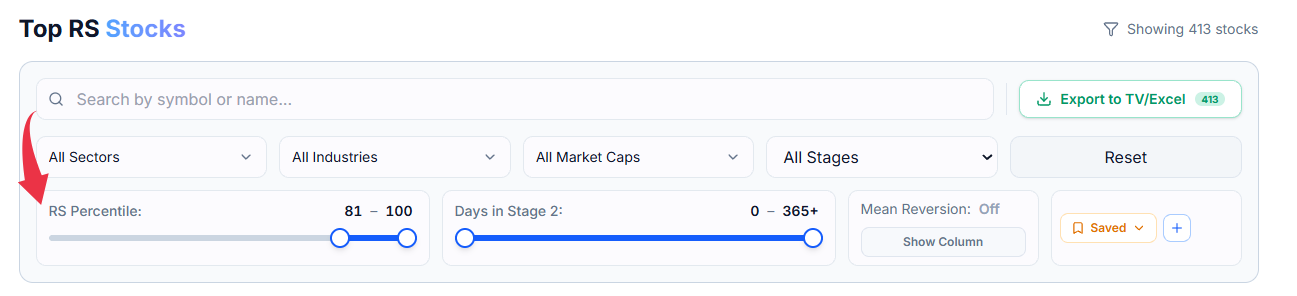
RS Percentile Slider
This slider lets you pick a range instead of a single dropdown option. Drag either end to set a minimum and maximum, and only stocks whose RS rating falls inside that range will show up. For example, dragging it to only show the top range gives you just the strongest-performing stocks in the market.
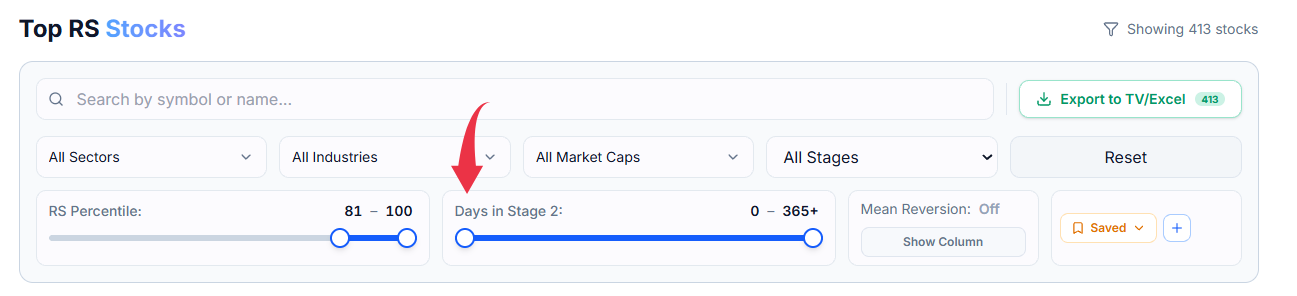
Days in Stage 2 Slider
This one filters by how long a stock has already been in Stage 2 — anywhere from 0 days up to 365 or more. It's useful if you want to tell the difference between a stock that just entered Stage 2 recently and one that's been there for a long stretch already.
They All Work Together
You can pick a sector, a size range, an RS range, and a Stage 2 range all at once, and the table will only show stocks that match every condition together.
You can set your default preferences and save your filters so you don't have to set them again and again.
Common Questions
Do I have to use every filter?
No — leave anything on its default setting to skip it. You can use just one filter, or all of them together.
How do I start over if I've changed too many filters?
Select Reset — it clears every filter and slider back to how the screen looked when you first opened it.
How do I filter for F&O stocks vs. the full universe?
Toggling the F&O switch off shows all 2,000+ stocks; toggling it on filters down to the roughly 200 F&O stocks.
Can I build a custom screen for stocks whose RS is increasing over a date range?
Currently only RS delta for 1 week and 1 month is available (via the triangle icon in the RS column) — a fully custom date-range screener isn't available yet, but it's planned.