Position Sizing Tool
Top-bar calculator for sizing a trade before you place it.
The Position Sizer works out how many shares to trade for a given entry, based on your capital and how much of it you're willing to risk.
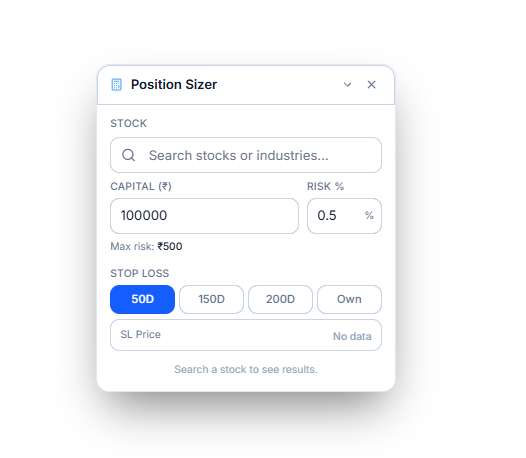
Setting Up the Calculation
- Stock — search and select the stock you're sizing a position for
- Entry Price — the price you're planning to enter at
- Capital — how much capital you're working with
- Risk % — what percentage of that capital you're willing to risk on this trade; this sets your Max risk in rupees
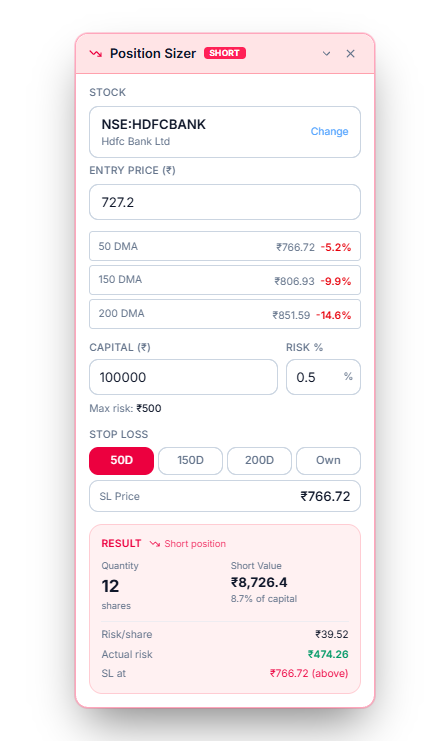
Choosing a Stop Loss
Below that, pick how the stop-loss price is set:
- 50D, 150D, or 200D — use that moving average as the stop-loss price automatically
- Own — enter an SL Price yourself
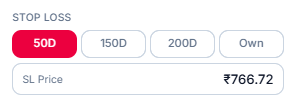
When you select a moving-average option, WealthLab also shows how far that average currently sits from the entry price, so you can see the gap before committing to it.
Reading the Result
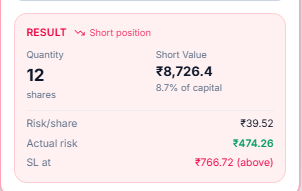
Once every field is filled, a Result panel appears, showing:
- Whether this comes out as a Long or Short position
- Quantity — how many shares the calculation arrives at
- The position's value in rupees, and what percentage of your capital that represents
- Risk/share and Actual risk — the rupee risk per share, and in total
- SL at — the stop-loss price used, and whether it sits above or below your entry
Common Questions
Does the Position Sizer place the trade for me?
No. It's a calculator only — it tells you the quantity and risk for a hypothetical entry, but doesn't connect to a broker or execute a trade for you.
Why does it say "Fill all fields to calculate"?
The Result panel only appears once every required field has a value — for example, if you pick Own as your stop-loss method, it won't calculate until you enter an SL Price.