Set an Alert
Get notified on a price level, RS crossing, Stage 2 change, or a trendline break.
An alert notifies when a stock, index, or price level does something worth acting on — a price crossing a level, RS strengthening or weakening, or a stock entering or exiting Stage 2. Alerts can be set on a stock, on an index, or by drawing a trendline.
Setting an Alert on a Stock
Open the page of the stock you want to watch and tap Alert, next to the Track button.

A window opens with three tabs at the top: Price, RS, and Stage 2. Pick whichever one matches what you want to be told about.
Getting Notified When a Price Is Hit
Use this when you're waiting for a stock to reach a certain price.
- Tap the Price tab.
- Choose Crosses above if you're waiting for the price to rise to your level, or Crosses below if you're waiting for it to fall to your level.
- In the Threshold box, type in the price you want to be notified at.
- Tap Create Alert.
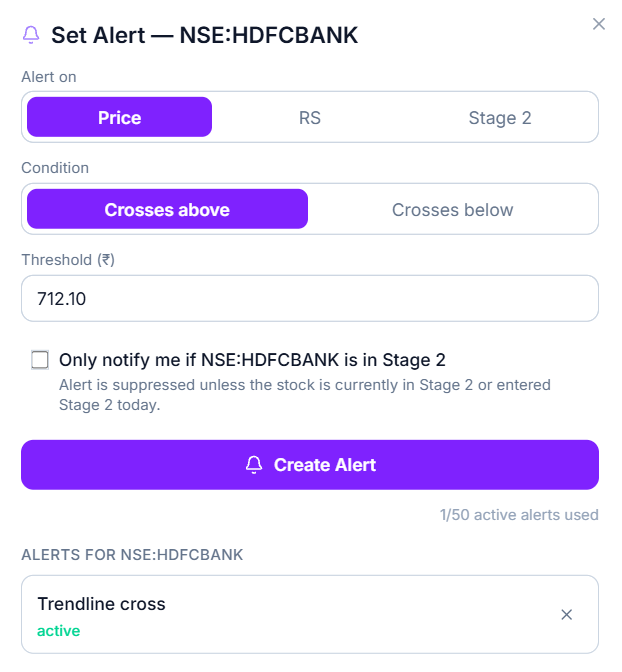
You'll be notified the day the price crosses that level.
Getting Notified When RS Crosses a Level
Use this when you're tracking a stock's relative strength rather than its price.
- Tap the RS tab.
- Choose Crosses above or Crosses below, depending on which direction you're watching for.
- Pick your RS lookback — 3-Month if you care about recent strength, 12-Month if you want a longer view.
- In the Threshold box, enter the RS level you want to be notified at (a number between 1 and 100).
- Tap Create Alert.
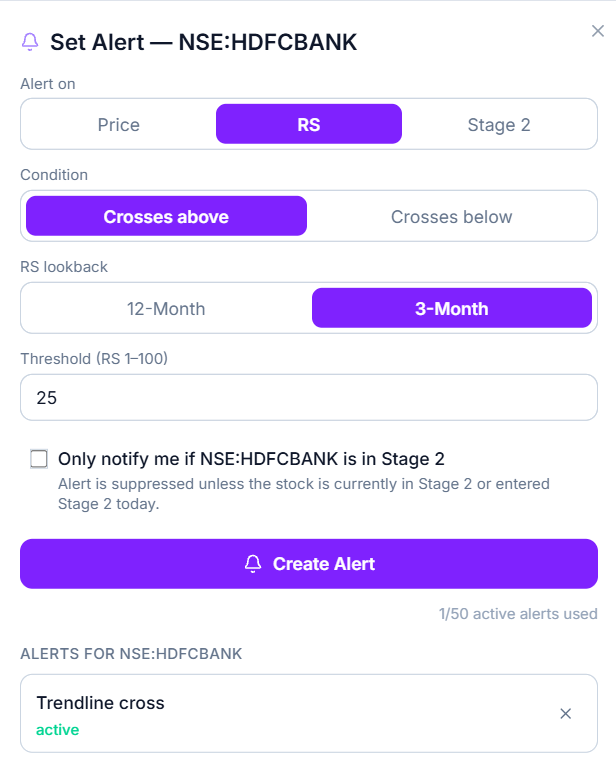
You'll be notified the day the stock's RS crosses that level.
Getting Notified on a Stage 2 Change
Use this when you want to know the exact day a stock's Stage changes — no price or number needed, just the event itself.
- Tap the Stage 2 tab.
- Choose Enters if you want to know when the stock moves into Stage 2, or Exits if you want to know when it leaves Stage 2.
- Tap Create Alert.
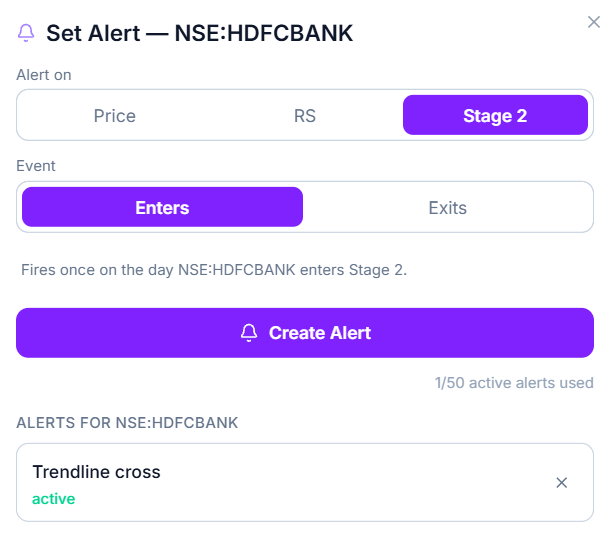
You'll be notified the day it happens — nothing else to fill in.
Only Getting Alerts While a Stock Is in Stage 2
Below the alert settings, there's a checkbox: Only notify me if [stock] is in Stage 2. Check this if you only want a Price or RS alert to fire while the stock is actively in Stage 2. Leave it unchecked if you want the alert to fire regardless of what Stage the stock is in.
Once everything's set, tap Create Alert to save it. At the bottom of the window, you'll see a running count of how many alerts you have active — you can have up to 50 at a time.
Setting an Alert on an Index
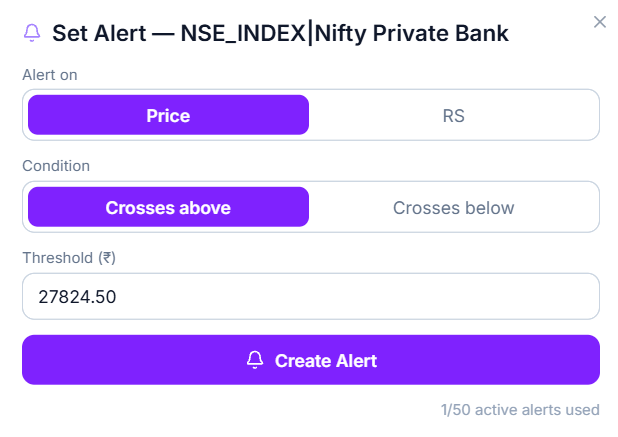
Alerts work the same way on a Nifty index, with two options instead of three: Price and RS. There's no Stage 2 option here — that only applies to individual stocks.
Open the index page and tap Alert.
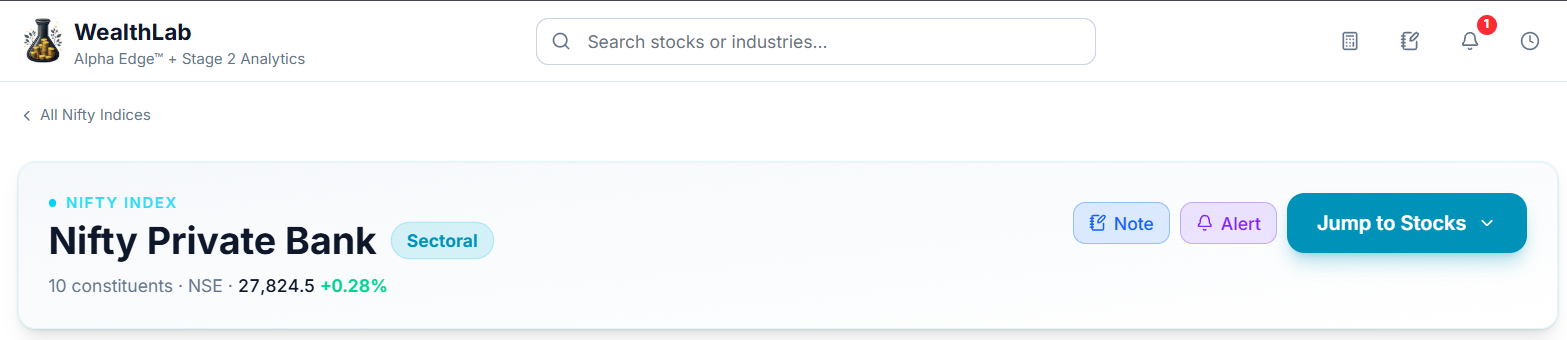
Getting Notified When the Index Price Is Hit
- Tap the Price tab.
- Choose Crosses above or Crosses below.
- Enter your target price in the Threshold box.
- Tap Create Alert.
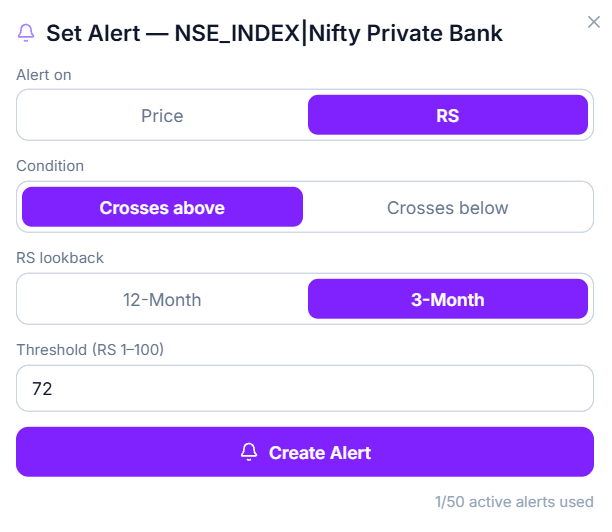
Getting Notified When the Index RS Crosses a Level
- Tap the RS tab.
- Choose Crosses above or Crosses below.
- Pick a lookback period — 3-Month or 12-Month.
- Enter the RS level you want to be notified at.
- Tap Create Alert.
Setting an Alert by Drawing a Trendline
Instead of typing a price, you can draw a line on a stock's chart — useful if you're watching a support or resistance level rather than one specific number.
- Open the stock's price chart.
- Select the Trendline tool from the toolbar on the left side of the chart.
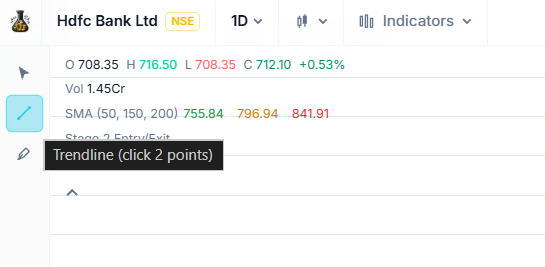
- Click two points on the chart to draw your line.
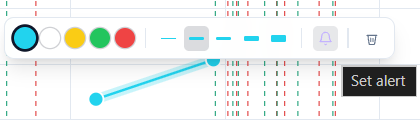
- On the small toolbar that appears next to your line, tap the bell icon to turn the alert on.
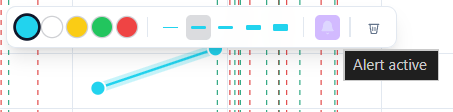
Once the bell icon fills in and shows Alert active, you're set — you'll be notified the moment the price crosses your line.
To turn this alert off later, tap the bell icon again. To delete the line entirely, tap the trash icon next to it.
Common Questions
How many alerts can I have running at the same time?
Up to 50. Every Set Alert window shows a live count of how many you have active, so you always know how many you have left.
Where do I go to see all my alerts, or check if one has triggered?
Open My Alerts — it lists every alert you've set, with Active, Triggered, and All tabs to filter by status.
I set an alert but haven't been notified — is it working?
Check My Alerts first to confirm it's showing as Active. If it's still Active, it simply hasn't been triggered yet — the condition you set hasn't happened.
If I zoom or scroll a chart, will my trendline alert still work correctly?
Yes. The line stays fixed at the actual price levels you drew it at, so the alert still triggers at those levels no matter how you're viewing the chart afterward.
Can I set more than one alert on the same stock?
Yes — you can set a Price, RS, and Stage 2 alert on the same stock at the same time, or set multiple alerts of the same type with different thresholds.
Related Articles
What Are Tools and Utilities? · Notifications and Alerts Work · Time Machine