Welcome to WealthLab
An introductory tour of what WealthLab does and how it's organized.
WealthLab helps you research Indian stocks using relative strength ranking, stage-based trend analysis, industry data, and earnings information — all in one place. Instead of jumping between separate tools for screening, charting, and fundamentals, you get one connected view of the market.
What WealthLab Shows You
WealthLab pulls together several ways of looking at the Indian stock market so you don't have to move between separate tools:
- RS Screener — ranks stocks by relative strength, so you can see which stocks are outperforming or underperforming the broader market.
- Stage 2 — classifies stocks into a trend stage (S1 through S4) using a weekly framework, so you can see where a stock sits in its broader trend.
- Industries Explorer — ranks industries the same way, so you can see where strength is concentrated at the industry level.
- Market Breadth — summarizes overall market conditions, breadth, and macro data.
- Earnings Screen — surfaces earnings results and announcements you can filter and query.
- Tracking and the Trading Journal — let you save stocks you're watching and log your own trades.
- Indian Macro High Frequency Data — shows monthly, high-frequency economic indicators across seven areas of the economy: consumption, industry, services, fiscal, monetary, external, and flows.
How the Platform Is Organized
Everything is reachable from the sidebar. Screens are grouped by what they analyze — Market Health, RS Analysis, Stage 2, Industry and Sectors, Earnings Analysis, and individual Stock pages — plus separate sections for Tracking, your Trading Journal, Tools, and your Account.
Tools and Data on WealthLab
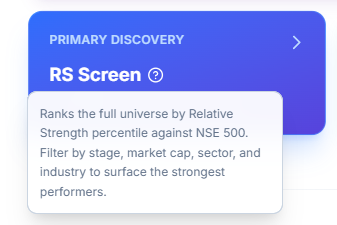
Across the platform, you'll find a variety of tools and data points designed to help you in your investing and trading journey. At any point, if you're confused or unsure about what a particular tool or data point is meant for, you'll find a question mark next to it. Simply hover over it to understand what it means and how to make the best use of that data.
Where to Go Next
If you already know what you're looking for, see Where Should I Start on WealthLab?
Common Questions
Is there a WealthLab app on the App Store / Play Store?
No — WealthLab isn't listed on the App Store or Play Store, since it's built as a Progressive Web App (PWA) to allow faster iteration and updates without requiring users to manually update an app.
How do I install the app on Android?
Open the site in Chrome, tap the three-dot menu, and select "Add to Home screen" / "Install app."
How do I install the app on a MacBook/desktop?
In Safari or Chrome, select the install/download icon in the browser's URL bar.
Is there a difference between using the web app in Chrome vs. the installed (desktop) app?
No — both offer exactly the same features and experience. Use Chrome or your browser if you like working across multiple tabs simultaneously; use the installed app if you prefer focusing on one flow at a time.
Related Articles
Create Your Account and Log In · Navigating the Sidebar · Where Should I Start on WealthLab?