Side Navigation Bar
Explains how the sidebar's sections organize the platform.
Was this helpful?
The sidebar helps you move between every screen in WealthLab.
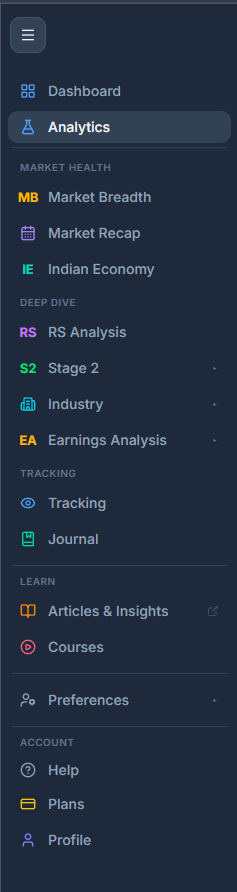
What's in the Sidebar
The sidebar groups screens into sections:
- Dashboard — your customisable overview with widgets.
- Analytics — your account's home page, with a whole-market snapshot and quick links into everything else.
- Market Breadth — market breadth, plus the weekly Market Recap.
- Indian Economy — India HF Macro Data, covering consumption, industry, services, fiscal, monetary, external, and flows.
- RS Analysis — the RS Screener and its filters.
- Stage 2 — Stage 2 stocks, Stage badges, plus Stage 2 History.
- Industry — the Industries Explorer, plus Nifty Indices which is the official NSE indices, ranked against each other by RS, Stage, and momentum.
- Earnings Analysis — the Earnings Screen and the Announcements Feed.
- Tracking — your watchlists and Portfolio Pulse.
- Trading Journal — your logged trades and monthly stats.
- Articles — written guides and explainers.
- Video Courses — video-based lessons and tutorials.
- Preferences — your account settings and preferences.
- Help — support and how-to resources.
- Plan — your subscription and billing.
- Profile — your personal account details.
Jump to a Section
Select any section name to expand it and see the screens inside. Selecting a screen name takes you straight there.
Related Articles
Welcome to WealthLab · Top Navigation Bar · Search Bar: Find Stocks, Industries, and Indices